Marketing
What Is Schema Markup, and How Can It Help Your Website Rank Better?
Does your website 'speak' Google's language? With Schema.org and structured data, you can significantly improve your search visibility, earn attractive rich snippets, and draw in more users - without changing your content. See how to implement schema on WordPress, Shopify, or PrestaShop, and how to test it properly.

In this article, you'll learn:
- What is Schema.org, and what is structured data?
- How - and why - did Schema come about?
- What SEO benefits does structured data offer?
- What are Open Graph tags, and how do they complement Schema?
- How do you implement Schema data on a website or online store?
- Schema code examples (JSON-LD)
- How do you test whether your Schema data has been implemented correctly?
Did you know you can "tell" search engines what your page's content is about using a special piece of code? We're talking about structured data and the Schema.org standard. In this article, we explain what Schema.org and structured data are, give a brief history of how the standard came about, describe the SEO benefits of using it (including the famous rich snippets and higher click-through rates), and compare Schema with the Open Graph tags used on social media. We'll also show you how to implement Schema.org markup on different platforms - from WordPress, through Shopify, to PrestaShop - both using plugins/modules and manually in JSON-LD format. At the end, you'll find sample JSON-LD code for a blog article, a product page, and a local business, plus information on Google's tools for testing structured data. Let's get started!
What is Schema.org, and what is structured data?
Structured data is a standardized way of presenting information about a webpage within its code, so that it's understandable to search engine crawlers. In other words, it's an extra layer of description we add to the HTML - usually as special tags or a JSON script - to give search engines context and meaning about the data on the page. For example, if a page contains a recipe, structured data can spell out details like the ingredient list, prep time, calorie count, and so on. This lets Google's or Bing's crawlers better understand what's on the page and how to classify that content.
Schema.org, in turn, is an open vocabulary (schema) of structured data markup, developed and supported by the biggest search engines. Schema.org provides a standardized set of data type definitions (so-called schema types) such as Article, Product, Recipe, LocalBusiness, and many others, along with a full list of the attributes (properties) that can be defined for each. Using the vocabulary from schema.org, webmasters can mark up specific elements of a page - such as an article's title and author, a product's price and availability, a company's address, and so on - in a standardized way that all major search engines understand. This also means providing more valuable data, which strengthens how our page and its content show up in search results.
Structured data gets embedded in a page's HTML code, and there are several ways to do it. Historically, microdata and RDFa were popular - special HTML attributes (like itemprop, itemscope, etc.) added to page elements. Today, though, the most convenient method is the JSON-LD format (JavaScript Object Notation for Linked Data) - a standalone <script type="application/ld+json"> block placed in the page's <head> or <body>. JSON-LD has the advantage of not requiring you to modify the existing HTML element by element - you just attach a ready-made block of defined data. Google, for its part, officially recommends the JSON-LD format for implementing schema. Regardless of the form used (microdata or JSON-LD), the effect for search engines is similar - they receive structured information about the page's content.
A brief history of Schema.org
The Schema.org standard was born out of the need to standardize how webmasters pass extra information about their pages to search engines. Before that, various competing schemas and microformats existed, creating chaos - each search engine might interpret data differently or support a different standard. That's why, in June 2011, the three biggest companies - Google, Microsoft (Bing), and Yahoo - jointly announced the launch of the Schema.org initiative. Russia's Yandex joined them as early as November 2011. This was a breakthrough, since search engines that normally compete with each other agreed to collaborate on a single shared markup schema.
In practical terms, this meant creating the schema.org site, containing documentation for all the agreed-upon structured data types, along with ongoing development of that vocabulary. Schema.org is a living project - it has seen numerous updates and extensions since it was created. By mid-2021, the Schema.org project had already gone through 13 updates containing improvements and new markup types. Schema.org also absorbs other, earlier ontologies - for example, in 2012 it incorporated the GoodRelations schema for e-commerce data. Importantly, Schema.org has supported multiple implementation formats from the start - the aforementioned microdata and RDFa, as well as JSON-LD (since 2015, when Google began supporting it, which has since become the preferred method).
To sum up, Schema.org is the result of collaboration between the biggest search engines, created to make it easier for search engines to index sites and better understand the content of web pages. Instead of many standards, there's now one universal "language" for describing a page's structure - sometimes referred to as the universal language of the internet.
The SEO benefits of using Schema.org structured data
Since adding structured data takes some effort, it's worth asking: what does schema actually get you? It turns out the benefits of implementing schema can be quite measurable, especially when it comes to how search results look and the traffic you get from SEO. Here are the main benefits your website can gain from implementing schema data:
- Rich results (rich snippets) - these are highlighted pieces of information that Google and other search engines can display in results when a page provides structured data. Examples of a rich result include the yellow star ratings next to a product or review, a product's price and availability, a photo and prep time for a recipe, an event date in an event listing, an FAQ section in the results, and more. In practice, structured data makes it possible to show extra information in Google's results that catches the user's eye. A page without structured data will show up as a plain result with just a title and description, while a page with schema implemented correctly can earn attractive snippets with extra details. That makes the result stand out from the competition.
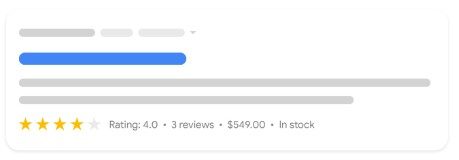
- Higher CTR and more traffic - because results with enhanced elements are more visually and informationally appealing, users are more likely to click on them. Many case studies have shown a significant increase in click-through rate (CTR) after implementing structured data. Google, for instance, reports that Rotten Tomatoes saw a 25% CTR increase, and Nestlé's sites saw an even bigger 82% CTR boost on pages with structured data implemented. That translates directly into more organic search traffic. Using schema alone won't boost your ranking position, but Google's better understanding of context can improve how well a page matches search intent, and enriched results generally lead to a higher CTR. In other words, structured data helps you "pull" more traffic out of Google without changing your content or building extra links.
- Better visibility and brand distinction - rich results don't just boost click-through rates, they also build brand awareness. When a user repeatedly sees a high product rating (stars) or an FAQ from your site in the results, they start to associate your site with authority on that topic. On top of that, certain markup types, like Organization or LocalBusiness, let you display company information, a logo, contact details, and more in the Knowledge Graph (Google's information panel) - which also boosts your brand's visibility online.
- A better fit for voice search and assistants - structured data can be used by Google Assistant, Alexa, and other systems to answer users' questions. For example, if someone asks out loud, "OK Google, how many calories are in lasagna?" and your recipe has calorie information in its structured data, the assistant can use exactly that information in its answer. Having structured data therefore increases the chances that your content will be used in direct answers (so-called featured snippets or Q&A-style results).
- Better understanding of your page by algorithms (though with no direct effect on ranking) - one point worth stressing: Google officially states that structured data is not a ranking factor (meaning that simply having it won't move a page up in the results). However, it does help algorithms better understand a page's content and context, which can indirectly help it get properly classified and shown for more relevant user queries. As a result, a page may get more impressions for relevant, long-tail search phrases. On top of that, if a page gives Google a complete set of data (e.g., a product has its price, availability, and reviews specified), it reduces the risk of the search engine misinterpreting the content.
These benefits translate into real business value - more traffic and potentially more conversions, a better presentation of your offer right at the search engine level, and a more professional brand image. It's no surprise that Google "likes" pages with correctly implemented Schema.org markup - it may not reward them with a higher ranking just for having the data, but it does reward them indirectly through more attractive results and greater visibility. In a world where competition for user attention is fierce, schema is a relatively simple way to gain an edge.
The most popular types of structured data in SEO
It's worth mentioning that there are a huge number of schema markup types - not all of them result in enhanced elements showing up in results, but many do. The ones most commonly used for SEO purposes include:
- Product - for product pages (online stores). Lets you convey information like price, availability, brand, and ratings and reviews, which can appear in results (e.g., stars, price).
- BreadcrumbList - so-called breadcrumbs. These help display a category/section "path" in results instead of just the raw URL, making the result more readable and showing the site's structure.
- Article/BlogPosting - for blog articles and news pieces. Lets you mark up the title, author, publication date, image, description, and so on. Often used by Google to build carousel results in Top Stories, or simply to make it easier to understand news content.
- Recipe - for cooking recipes. Enables rich results with a photo of the dish, ratings, prep time, calorie count, and an ingredient list.
- FAQ - a questions-and-answers section. Correctly implemented (as FAQPage), it can result in expandable questions and answers from your page appearing beneath the search result (which greatly increases the space your result occupies).
- Event - for events (concerts, conferences, webinars, etc.). Lets you show the date, location, ticket price, and so on directly in results.
- LocalBusiness/Organization - company data, such as address, phone number, opening hours, and geographic coordinates. Mostly used in the Knowledge Graph and Google Maps, but can also enrich a regular result (e.g., through a link to a map, a local business rating, etc.).
These are just a handful of examples - schema.org contains hundreds of types, from obvious ones like Person or Movie to specialized ones like MedicalCondition or FAQPage. The key is choosing the ones that fit your site's content and can genuinely benefit you, whether through a better look in the SERP or a better understanding of your content by the search engine.
What are Open Graph tags, and how do they complement Schema? (social media)
Besides schema.org structured data, which is aimed mainly at search engines, there's another type of metadata worth mentioning - Open Graph. Open Graph tags (OG) are HTML meta tags (placed in a page's <head>) introduced by Facebook to let any website behave like an "object" within the social graph. Put simply, Open Graph lets you define how your page/URL will look when it's shared on social platforms like Facebook, LinkedIn, or Twitter. Typical OG tags include:
og:title- the page's title (e.g., an article's or product's title),og:description- the page's description (a short lead),og:image- the URL of the image to show in the preview (e.g., an article's or product's photo),og:url- the page's canonical URL,og:type- the object type (e.g., article, product, video.movie, etc.), which can determine additional fields.
For example, a blog article's Open Graph meta tags might look like this:
<meta property="og:title" content="10 Healthy Breakfast Ideas" />
<meta property="og:description" content="Discover recipes for delicious, quick, healthy breakfasts..." />
<meta property="og:image" content="https://example.com/images/breakfast.jpg" />
<meta property="og:url" content="https://example.com/blog/healthy-breakfast" />
<meta property="og:type" content="article" />
Thanks to this, when someone pastes a link to this article on Facebook, it generates a nice card with the title, description, and a thumbnail image. The same happens on LinkedIn. Twitter, meanwhile, uses so-called Twitter Cards, which are similar to OG (many sites simply use the og:title tag, which Twitter also reads, possibly alongside its own tags like twitter:card).
Does Open Graph affect SEO?
Not directly - Open Graph tags aren't used by Google to rank pages or to display rich results. They're aimed mainly at social media crawlers (the Facebook crawler, LinkedIn bot, etc.). Indirectly, though, they can help: content that's well presented and looks attractive on social media can earn more clicks and shares, which increases reach and traffic to the site. What's more, Open Graph complements structured data - it's an additional, structured set of metadata about a page, just aimed at social platforms rather than search engines.
It's also worth noting that Open Graph and Schema.org are separate standards that don't compete with each other - they complement each other. You can (and should) have both schema.org markup for Google and OG meta tags for Facebook and other platforms on the same page at the same time. For example, a product page can have both a JSON-LD Product entry for Google and og:title, og:image, etc. meta tags to ensure a correct preview on Facebook.
OG is technically a separate protocol, but it also conveys certain structured information that search engines can make use of when trying to understand a page more generally. As one analysis has noted, Open Graph provides structured metadata for search engines (even though it's aimed mainly at social media), which helps them better understand a page's content. While OG tags on their own don't affect ranking, they complement Schema.org structured data and can support a page's indexing by providing more complete information. To sum up: Schema.org is the "language" of structured data for Google/Bing, and Open Graph is the "language" of metadata for Facebook and social media - it's worth using both, so that both search engines and social platforms have the full picture of your page.
How do you implement Schema.org on a website?
Now that we know it's worth doing, let's get practical: how do you add Schema.org markup to your site or store? Implementation can look different depending on the platform/CMS you use. In general, there are two approaches:
- Automatically, using the right plugins or modules - many CMS platforms offer add-ons that generate structured data for you. This is often the simplest route for non-technical users.
- Manually, by adding JSON-LD code or microdata to the page template - an option for more advanced users, when you want full control or when there's no dedicated plugin available.
Below, we describe how this looks on three popular platforms: WordPress, Shopify, and PrestaShop.
WordPress - implementing Schema structured data
WordPress is currently the most popular CMS, and one of its advantages is a huge number of ready-made SEO plugins that make adding schema easier. If you're using WordPress, the simplest method is to use an SEO plugin with Schema.org support, such as Rank Math, Yoast SEO, All in One SEO, or a dedicated schema plugin. Google itself suggests that if you're using a CMS, it's worth using available plugins rather than implementing everything by hand. These kinds of plugins automate the process of adding JSON-LD markup to your page's code.
For example, Rank Math (a free SEO plugin) lets you add a schema for different content types right from the post editor: you can mark a post as an article, an FAQ entry, a recipe, a product, and so on - the plugin generates the appropriate JSON-LD script. Rank Math also has a Schema Generator module, where you can click together your own schema or import existing JSON-LD code and assign it to selected pages. Another popular plugin, Yoast SEO, automatically adds basic structured data like BreadcrumbList, Article (for blog posts), or WebSite/Organization (for the whole site). In most cases, installing one of these plugins and turning on the right options means you don't have to write a single line of code - the schema gets added to your page's HTML automatically.
Of course, plugins have their limitations - they often only cover the most common data types. If you need something custom, or want full control, you can add JSON-LD manually. In WordPress, you can do this, for example, by inserting a <script type="application/ld+json">...</script> block inside a template (e.g., in a child theme's header.php file) or by using hooks. You can also use smaller plugins like Code Snippets to inject a JSON-LD code snippet globally or only on selected subpages.
Tip: If you're using WooCommerce (the store plugin for WP), a lot of structured data for products is added automatically (e.g., Product, Offer, AggregateRating) - just make sure your theme isn't stripping these fragments out. For custom setups, you can always fall back on ready-made JSON-LD generators (e.g., the schema generator in Rank Math, or online tools) and paste the result into your page's code.
To sum up, on WordPress the easiest path is to configure an SEO plugin with structured data support, which takes just a few minutes and covers most of the markup you'll need without touching any code.
Shopify - implementing structured data in a store
Shopify (a popular online store platform) also lets you add structured data, though the approach is a bit different from WordPress. Here you have a few options:
- Using an app from the Shopify App Store - for example, the Smart SEO app, or other apps dedicated to schema. These apps automatically generate and add the right JSON-LD scripts to your store, with markup for products, pages, and so on, in the recommended format. This is convenient because it doesn't require any technical knowledge - you install the app, configure a few options, and structured data appears on all your product pages, blog posts, homepage, and so on. (Smart SEO, for instance, advertises JSON-LD support for products, blog posts, collection pages, and more, with automatic updates.)
- Manually editing the theme code (Liquid) - Shopify lets you edit theme templates, which are written in the Liquid language. Someone with experience can add JSON-LD code directly into template files. This is typically done by creating or editing a snippet and inserting it in the right place. For example, for product pages you'd edit the
product.liquidfile (or the relevant product section template) and paste in a<script type="application/ld+json">block filled with JSON, using Liquid variables (like{{ product.title }},{{ product.price }}, etc.) to dynamically pull in product data. You can do the same for blog articles (thearticle.liquidfile) or the homepage (theme.liquid- adding, for example, an Organization tag). The manual approach gives you a lot of flexibility, but requires knowledge of Liquid, HTML, and JSON-LD - beginners can easily make mistakes here, which is why Shopify recommends this route mainly for experienced developers. - Hiring a specialist (a Shopify Expert) - If you don't want to use a ready-made app and don't have the know-how yourself, you can always get help from a Shopify expert who'll implement the schema for you. We mention this for completeness - Shopify has official partners (freelancers/agencies) who can provide this kind of service. For most SaaS-based stores, though, a dedicated app will be a better option (simpler and often cheaper).
It's worth knowing that many modern Shopify themes already have basic structured data markup built in. For example, the default Dawn theme includes JSON-LD snippets for products (Product, Offer, AggregateRating), for collection listings (BreadcrumbList, ItemList), and so on. Check your theme's documentation - some of the work might already be done for you. However, if your online store uses a theme that doesn't have this, or you want to expand the scope of your data (e.g., add an FAQ markup to your FAQ pages, or a Recipe markup to a recipe blog), the apps or manual additions mentioned above can help.
Practical tip: After adding structured data (whether via an app or manually), test your product page with Google's Rich Results Test tool - this lets you confirm Google correctly sees things like a product's price, availability, and reviews. On Shopify, small mistakes in Liquid can sometimes cause issues like duplicate markup - it's worth catching these through testing.
PrestaShop - implementing schema in an online store
PrestaShop (a popular open-source store engine) also lets you implement schema.org in a few different ways. With PrestaShop, it's worth noting that the default Presta theme already includes some built-in microdata (rich snippets) for products - for example, tags for price, availability, and product rating in the product template. As one PrestaShop forum moderator noted, the default template already has most of the basic rich snippets implemented. That said, if you want to add more detail or other types of structured data, you'll need modules or template edits.
Option 1: a ready-made PrestaShop module - On the Presta marketplace (addons.prestashop.com), you'll find many modules related to SEO and structured data. For example, modules like "SEO Rich Snippets" or "Schema.org Markup" automatically add JSON-LD to your store: product descriptions, company data, location, breadcrumbs, and so on. Some of these modules are paid, but their advantage is simplicity - you install the module in PrestaShop, enable it, configure it (e.g., enter your company name, contact details), and the module attaches the right code to the front end. If you don't want to dig into the code, using a module is the simplest route.
Option 2: editing templates (.tpl) - For more technical users or unusual requirements, you can add the markup you need directly into Presta's template files yourself. Template files (.tpl) in PrestaShop (especially in versions 1.6/1.7) contain HTML code with built-in Smarty variables. You can add both microdata (by adding itemprop, itemscope attributes to existing elements) and whole JSON-LD blocks. For example, in the product.tpl file, you can place a JSON-LD script defining a Product object with fields populated by Smarty variables (e.g., {$product.name} for the name, {$product.price} for the price, etc.). Similarly, you can add an Organization tag with your store's name and logo in the header.tpl file. Just keep in mind that any theme or Presta update can overwrite your changes, so it's better to do this in a child theme or keep a record of your changes.
Option 3: modules dedicated to specific elements - Sometimes you only need to add something specific, like a rating markup for reviews or breadcrumbs. There are modules that add specific functionality (e.g., an advanced customer review system that also adds review and rating structured data as a side effect). It's worth checking whether the feature you want isn't already covered by another module you're already using.
In general, many PrestaShop developers recommend using a ready-made module for full schema.org coverage in a store, especially since PrestaShop 1.6/1.7 only has basic schema integration built into its templates (e.g., for products and breadcrumbs), and more advanced data has to be added yourself. Simple fixes can improve things a lot (e.g., making sure itemprop tags are present for price, availability, and product name in the template), but that's still just the basics. If you want to, say, add a full Product markup in JSON-LD format, or cover your FAQ page with FAQPage markup, base Presta doesn't offer that out of the box - which is where an extra module often becomes necessary.
Schema structured data in Shoper
The Shoper platform also implements Schema.org structured data, but in a limited and closed way - meaning the user doesn't have full control over its structure or content. Most Shoper templates include basic microdata for product pages (e.g., Product, Offer), but these are often embedded in the HTML code as itemprop attributes, which limits how much you can expand or customize them.
Some Shoper themes and apps also offer structured data for breadcrumbs, organization info, or blog posts, but there's no support for JSON-LD, which is what Google recommends. What's more, Shoper users don't have direct access to the source code (unlike, say, Shopify's Liquid templates), so full JSON-LD markup can't be added on your own, unless the platform enables it through a custom implementation (e.g., via a technical service request or on higher-tier subscription plans).
If you're using Shoper and want to be sure your structured data is complete and follows Google's guidelines, it's worth:
- checking what your theme already generates (e.g., using the Rich Results Test),
- contacting Shoper's technical support,
- or considering a custom implementation through an external Shoper partner.
Implementation summary: Every platform has its own way of doing things, but the universal advice is: if there's a proven plugin/module for your CMS that adds structured data, use it (you'll save time and reduce the risk of mistakes). If not, or if you have very specific requirements, you're left with adding the code manually - which requires care and testing. Also remember that after implementation, you should always test the page with Google's tools (more on that shortly), to confirm everything is being read correctly.
Schema code examples (JSON-LD)
In this section, you'll find concrete JSON-LD code examples for different types of pages. Feel free to treat them as a starting point for implementing structured data on your own site. Remember to always adjust the values to your own page (e.g., titles, URLs, prices, dates). For readability, these examples are incomplete (they contain only the most important fields), but it's always worth adding as many of the recommended schema.org attributes as you have data for.
Schema example: a blog article (Article/BlogPosting)
Let's say we want to mark up a blog post, such as a how-to article. The ideal schema type here would be BlogPosting (a subtype of Article). The JSON-LD code might look like this:
<script type="application/ld+json">
{
 "@context": "https://schema.org",
 "@type": "BlogPosting",
 "mainEntityOfPage": {
 "@type": "WebPage",
 "@id": "https://example.com/blog/how-to-make-lasagna"
 },
 "headline": "How to Make Delicious Lasagna - A Step-by-Step Guide",
 "description": "Learn how to make traditional Italian lasagna with a rich Bolognese sauce and béchamel. A step-by-step recipe.",
 "image": "https://example.com/images/lasagna.jpg",
 "author": {
 "@type": "Person",
 "name": "John Smith"
 },
 "publisher": {
 "@type": "Organization",
 "name": "Example Food Blog",
 "logo": {
 "@type": "ImageObject",
 "url": "https://example.com/logo.png"
 }
 },
 "datePublished": "2025-05-01",
 "dateModified": "2025-05-03"
}
</script>
In the code above, we described the article: we specified a unique page identifier (mainEntityOfPage with a URL), a title (headline), a description, an image (a thumbnail of the dish), an author, and a publisher (here set as an organization - the blog). We also included publication and modification dates. A data set like this should be more than enough for Google to understand that the page is a blog article. This lets Google, for example, display the article in mobile Top Stories results, or simply better understand its topic (though you shouldn't expect rich snippets like stars or anything extra for ordinary articles, aside from possibly the publication date).
Schema example: a product page (Product)
For product pages, we can use the Product schema type. The important elements here are offer information (price, currency, availability) and, potentially, reviews/ratings. A sample JSON-LD block for a product page might look like this:
<script type="application/ld+json">
{
 "@context": "https://schema.org",
 "@type": "Product",
 "name": "XYZ Smartphone 128GB",
 "image": [
 "https://example.com/images/xyz_smartphone_front.jpg",
 "https://example.com/images/xyz_smartphone_back.jpg"
 ],
 "description": "XYZ smartphone with a 6.5-inch display, 128GB of storage, and a 48MP camera.",
 "sku": "XYZ-128-BLACK",
 "brand": {
 "@type": "Brand",
 "name": "XYZ Electronics"
 },
 "review": {
 "@type": "Review",
 "reviewRating": {
 "@type": "Rating",
 "ratingValue": "4.5",
 "bestRating": "5"
 },
 "author": {
 "@type": "Person",
 "name": "Jane Doe"
 },
 "description": "The phone runs very smoothly, with a great screen and a good camera. The battery could be better.",
 "datePublished": "2025-04-10"
 },
 "aggregateRating": {
 "@type": "AggregateRating",
 "ratingValue": "4.4",
 "reviewCount": "57"
 },
 "offers": {
 "@type": "Offer",
 "url": "https://example.com/store/xyz-smartphone-128gb",
 "priceCurrency": "PLN",
 "price": "1999.00",
 "priceValidUntil": "2025-12-31",
 "availability": "https://schema.org/InStock",
 "itemCondition": "https://schema.org/NewCondition"
 }
}
</script>
This code contains a fairly detailed description of the XYZ Smartphone 128GB: its name, several images, a product description, SKU, and brand. We also added a single review (Review - with a 4.5/5 rating and a comment from the author, Jane) and an aggregate rating (AggregateRating - an average of 4.4 based on 57 reviews). The key section is offers - information about the sale offer: price (1999.00 PLN), availability (InStock), a link to the product page, condition (new), and the offer's validity date. Google requires at least one of these elements (Review/AggregateRating or Offer) to display a product result with enhanced elements. With price, availability, and a rating in place, our product fully qualifies to be shown in results as a rich snippet (as in the image above, with stars, a price, and an availability label).
Of course, in practice, most stores generate this data dynamically (e.g., e-commerce platforms or SEO plugins automatically fill in the current price, review count, etc.). Still, this example illustrates the structure - you can use it as a template.
Schema example: a local business (LocalBusiness)
If you have a business website for a local business (e.g., a restaurant, a physical store, a service salon), it's worth adding a LocalBusiness markup. You can narrow it down to a more specific subtype, such as Restaurant, Store, or ProfessionalService - here we'll use the general LocalBusiness type. This kind of markup is often placed on the contact page or homepage. For example:
<script type="application/ld+json">
{
 "@context": "https://schema.org",
 "@type": "LocalBusiness",
 "name": "Kawiarnia Espresso Bar",
 "image": "https://example.com/images/venue.jpg",
 "telephone": "+48 123 456 789",
 "email": "biuro@espressobar.pl",
 "address": {
 "@type": "PostalAddress",
 "streetAddress": "Ul. Przykładowa 10",
 "addressLocality": "Kraków",
 "postalCode": "30-001",
 "addressCountry": "PL"
 },
 "geo": {
 "@type": "GeoCoordinates",
 "latitude": 50.06465,
 "longitude": 19.94498
 },
 "openingHours": "Mo-Fr 08:00-18:00",
 "url": "https://espressobar.pl",
 "priceRange": "$$"
}
</script>
Here, we're defining a local business - Kawiarnia Espresso Bar in Kraków. We provided basic contact details: phone, email, a full address (in PostalAddress format), and geographic coordinates (latitude/longitude). We also added opening hours (Mon-Fri, 8am-6pm) and a price range (priceRange - the conventional $$, which is often used for, say, restaurants). This kind of structured data can be used by Google in, for example, the Knowledge Graph (the side panel with business information) or when displaying local results. What's more, if your site doesn't use Google Business Profile, or simply as an additional source, this gives the search engine valuable information about your location and offer.
Note: For local businesses, it's worth considering a subtype if one fits - for example, @type: "Restaurant" lets you add extra fields (like a menu, ratings, etc.), @type: "Store" works for a retail shop, and so on. Schema.org has an entire hierarchy of LocalBusiness subtypes.
Testing your implementation - Google's tools
Implementing structured data is one thing, but it's just as important to check that everything works correctly and that your data is readable by the search engine. Fortunately, Google provides free tools for validating schema. In particular, it's worth knowing two of them:
- Rich Results Test - Google's official tool, which shows what rich results could be generated from the structured data on a given page. Just paste in a URL (or a snippet of HTML/JSON-LD code), and the tool will check for the presence of schema markup that Google supports, and show whether you qualify for things like star ratings, FAQ results, enhanced article results, and so on. It'll also flag any critical errors or warnings (e.g., a missing required "price" field in a Product). What's more, the Rich Results Test lets you preview how a search result with enhanced elements might potentially look. It's a great way to verify that your implementation is working and see what it produces.
- Schema Markup Validator (validator.schema.org) - a general tool for validating schema.org markup, maintained in collaboration with Google. It lets you check any schema code (even if Google doesn't use it in its results). In other words, the schema.org validator focuses on the syntax's correctness and its compliance with schema.org's definitions. It's the successor to the old Structured Data Testing Tool (SDTT), which Google retired - all validation independent of Google's specific requirements now happens on the schema.org site. If you're using markup that doesn't generate rich snippets (e.g., very detailed industry-specific schemas), it's worth using this validator to make sure your JSON-LD doesn't contain errors.
Google recommends starting your testing with the Rich Results Test, and using the Schema Markup Validator for general schema checks. Both tools are available online and free of charge. In addition, if you have a site verified in Google Search Console, then whenever structured data is detected, Google often shows an "Enhancements" section in the panel with reports (e.g., separate reports for Products, FAQs, Breadcrumbs, etc., with information on how many pages have data and any errors). Search Console can also alert you if, for example, your structured data suddenly stops working correctly (e.g., after a theme update).
Finally, remember that even a correct schema implementation doesn't guarantee rich results right away. Google treats structured data as a suggestion, and displays enhanced elements at its own discretion. That said, if your page meets the requirements and provides valuable content, the chances of getting rich snippets are very good. It's therefore worth making sure your structured data is complete and error-free (testing tools will help you get there).
How important is implementing Schema.org structured data?
Implementing Schema.org structured data isn't mandatory, but today it's one of the key elements of technical SEO. While a lack of schema markup won't stop Google from indexing a page, having it brings a range of benefits that are worth taking seriously - especially if you care about greater visibility and more effectively drawing in users from search results.
First and foremost, structured data helps search engines better understand our page's content and context. By marking up specific elements - such as a product, an article, a local business, a recipe, an event, or an FAQ section - Google's algorithms can precisely recognize what they're dealing with and match the page's content to user intent. That increases the odds of our page showing up in more relevant search results, especially for long-tail and context-driven queries.
The second, most visible advantage of Schema.org is the ability to display so-called rich search results (rich snippets). Thanks to structured data, Google can show extra information alongside our page, such as star ratings, product prices, availability, a recipe's prep time, expandable questions and answers, or breadcrumbs. These are elements that make a result stand out in the SERPs, catch the eye, and significantly boost click-through rate (CTR). Some sites have seen a 25-80% CTR increase after implementing schema - without any change in ranking position or content.
Importantly, Google confirms that schema isn't a direct ranking factor, but thanks to better query matching and a higher CTR, it can indirectly have a positive effect on ranking position and organic traffic. The more often users click on your result, the stronger a quality signal the algorithms receive.
Structured data also matters in the context of voice search and AI assistants, such as Google Assistant. Properly marked-up content - such as recipes, definitions, or answers to questions - can be read aloud as a voice answer, or show up in direct answers (featured snippets).
So it's worth implementing Schema. It's one of the simplest, yet also one of the most effective technical SEO techniques, and it doesn't require major changes to your content or link profile. If you care about:
- a better presentation in Google,
- more traffic from search engines,
- a professional brand impression,
- and being ready for the future (e.g., AI/voice search),
...then schema should be a priority.
Summary
Schema.org structured data is a powerful, yet fairly simple tool for improving communication between your page and search engines. With it, you can earn more attractive search results (rich snippets), a better understanding of your content by Google, and potentially more organic traffic. Combined with Open Graph meta tags, you'll also take care of how your page looks when shared on social media. The key is correct implementation - fortunately, for most popular platforms there are ready-made solutions (plugins, modules) that make this easier.
To close, we encourage you: take a look at your site and think about what information you could pass on to search engines through schema.org. Is it products from your store, blog articles, or maybe your business's location or events? Try implementing the right markup and see the results. You might see positive changes in Google's results within just a few weeks - your page standing out from the crowd. Good luck - here's hoping for the best possible results for your site!
If you want to make the most of structured data on your site or store, we're here to help.
- Not sure whether your schema is working correctly?
- Seeing errors in Google's test results?
- Want to implement structured data for products, articles, FAQs, locations, or events?
- Or maybe you want your page to start showing up with rich results (rich snippets), but don't know where to start?
Get in touch with our team - we'll help you implement schema from A to Z: from a technical audit, through code fixes, all the way to testing and monitoring.