Marketing
Phishing: Real Email Examples That Look a Little Too Real
Phishing is one of the most common forms of cybercrime. Criminals impersonate banks, courier companies, or even friends to steal login credentials or money. In this article, we explain how phishing works, its most common forms, and how to spot a suspicious message before it's too late.
The internet opens up huge opportunities, but unfortunately it also gives cybercriminals huge opportunities of their own. One of the most widely used attack methods is phishing. Even though it's been talked about for years, it still successfully tricks users into handing over their data, both private individuals and company employees alike. So it's worth knowing exactly what phishing is, how it works, and how to spot it.
What is phishing?
Phishing is a fraud technique that involves impersonating a trusted person, institution, or company to extract confidential information. This is most often login credentials, payment card numbers, personal data, or access to company systems.
Attackers usually use email, but phishing also shows up in text messages, messaging apps, and social media. The message usually looks very convincing, it includes the logo of a well-known company, a similar-looking sender address, or professionally written content.
Most often, the victim receives a message suggesting an urgent situation: the need to log into an account, confirm a payment, update a password, or collect a package. Clicking the link leads to a page that looks genuine but is actually controlled by criminals.
What is the goal of phishing?
The goal of phishing is to obtain data that can be used for financial gain or to carry out further attacks.
The stolen data is most often used to:
1. Steal money
If criminals get hold of banking login details or a payment card number, they can carry out transactions, transfers, or purchases directly.
2. Take over online accounts
Email inboxes or social media accounts often become a tool for further fraud, for example, sending phishing messages to other people.
3. Attack companies
Employee data can provide access to company systems. In such cases, phishing is often just the first step toward more serious incidents, such as ransomware.
4. Sell data online
Some stolen information ends up on the online black market. There, it can be sold to other criminals and used in further scams.
In short: data obtained through phishing is almost never the end goal in itself. It's more of a key that opens the door to further crimes.
The most common phishing methods
Phishing doesn't come in just one form. Criminals use various techniques to boost their chances of success.
Email phishing
The most classic form of attack. The victim receives a message impersonating a bank, an online store, a courier, or a system administrator.
Spear phishing
A more advanced version of phishing, targeted at a specific person or organization. The messages are prepared individually and include details that make them more convincing.
Smishing
Phishing carried out via text message. The messages often claim there's an outstanding balance on a package, an account block, or the need to pay a small additional fee. Recently in Poland, phishing text messages about deliveries or unpaid utility bills have become common.
Social media phishing
Attacks carried out through fake profiles or hijacked friends' accounts. The messages may contain links to "important documents," "photos," or "a video with you."
Regardless of the form, the mechanism is similar: stir up emotion and push the victim into acting quickly without thinking.
How to spot phishing
Although some phishing messages are very well crafted, many of them give away certain telltale warning signs.
An unusual sender address
At first glance it looks correct, but on closer inspection the domain turns out to be slightly altered or contains extra characters.
Time pressure
The message content suggests an urgent situation: the account will be blocked, a payment is about to expire, the data needs to be confirmed immediately.
Suspicious links
The link in the message leads to a page that looks similar to the real one, but the URL differs from the company's official website.
Language errors or unnatural phrasing
Many phishing messages contain typos, odd sentence structures, or a mix of languages.
A request for confidential data
A bank, government office, or large company rarely asks for passwords or full login credentials in an email.
It's also good practice to check links before clicking them, and to log into services directly through the official website rather than through a link in a message.
Phishing in practice - examples of phishing emails
Below are a few phishing emails we've come across, along with a breakdown of how to recognize a phishing attempt and what consequences it can carry.
Important emails in quarantine
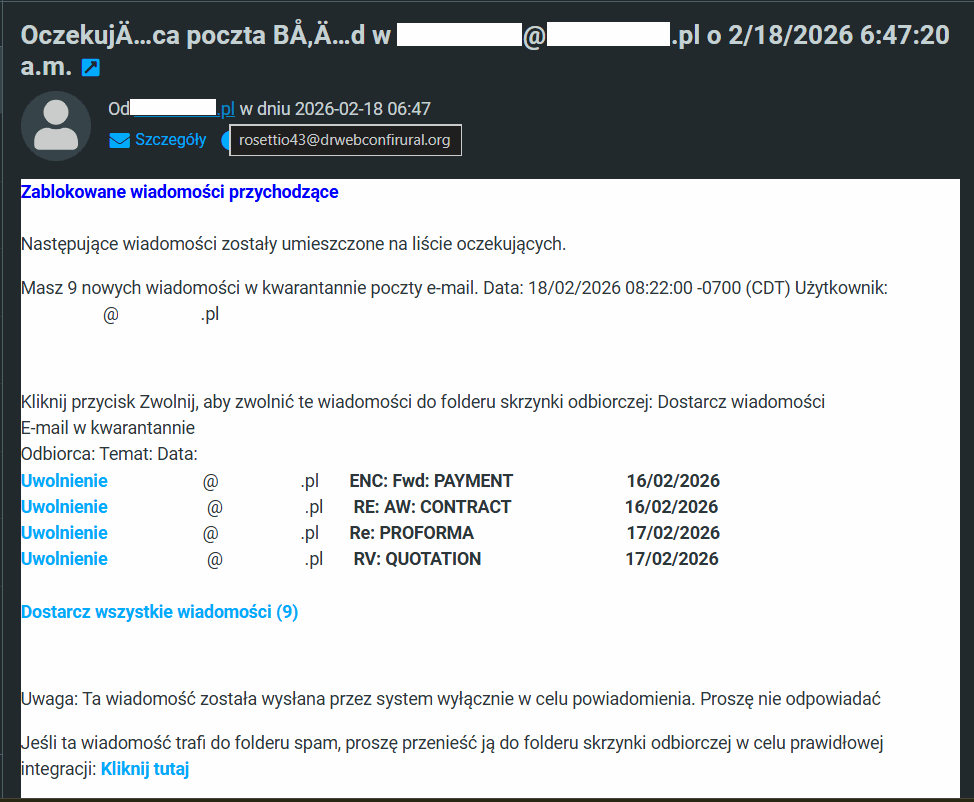
This message suggests that some very important emails about a payment, a contract, or a pro forma invoice are sitting in email quarantine. It urges the recipient to click "Deliver all messages" so they return to the inbox and can be reviewed and handled.
Clicking most likely leads to a page requiring the user to log into their inbox, a page that of course impersonates an email client, with the goal of stealing login credentials.
What stands out here is the poor formatting of Polish characters in the subject line, and the fact that the real sender isn't the domain of the company that received the email, but a completely different, suspicious-looking address.
Email verification
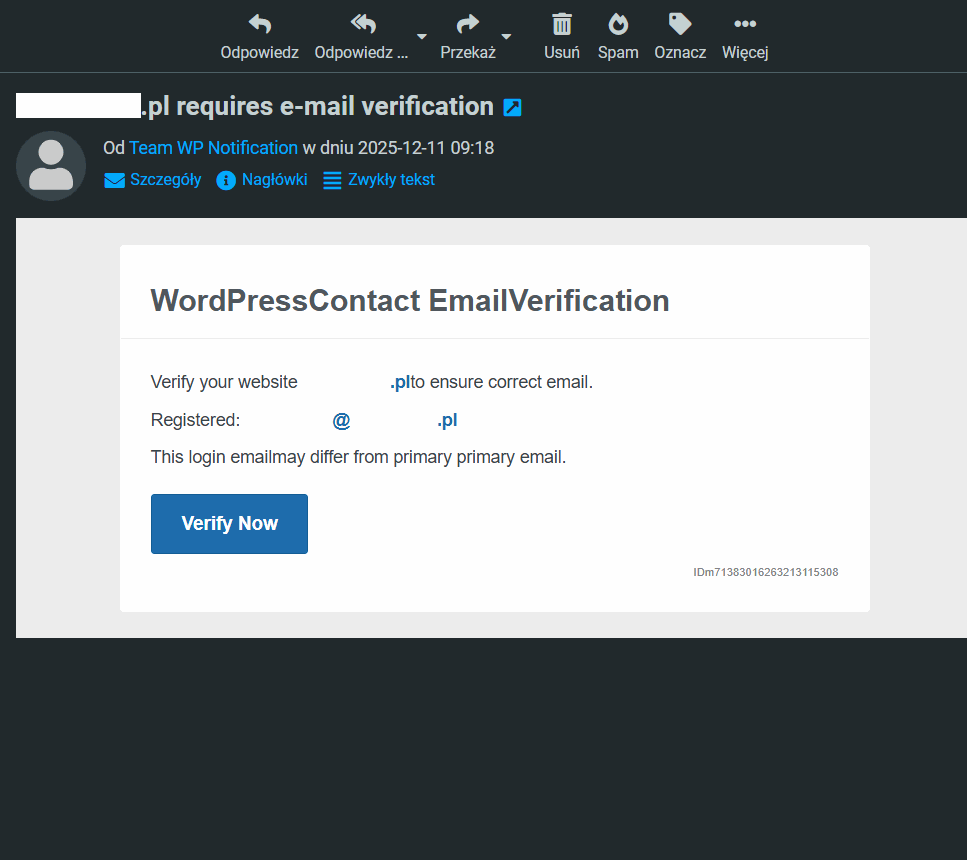
At first glance, this message simply asks you to verify the email linked to WordPress. The problem is that WordPress doesn't send messages like this, it only asks you to confirm the administrator's email address is current when you log in.
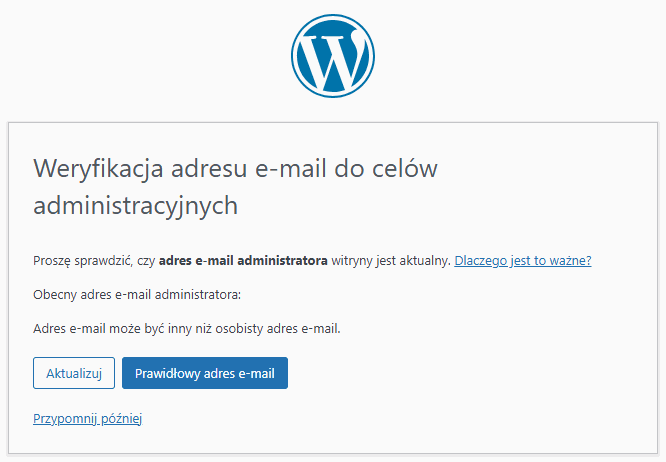
The email doesn't specify what the address it's supposedly asking us to verify is even linked to. Errors in the text, like missing spaces between words, raise even more suspicion. The goal of this email is, of course, to obtain login credentials for a WordPress-based site, the sender clearly knows the recipient's site runs on that platform.
A fake DocuSign document
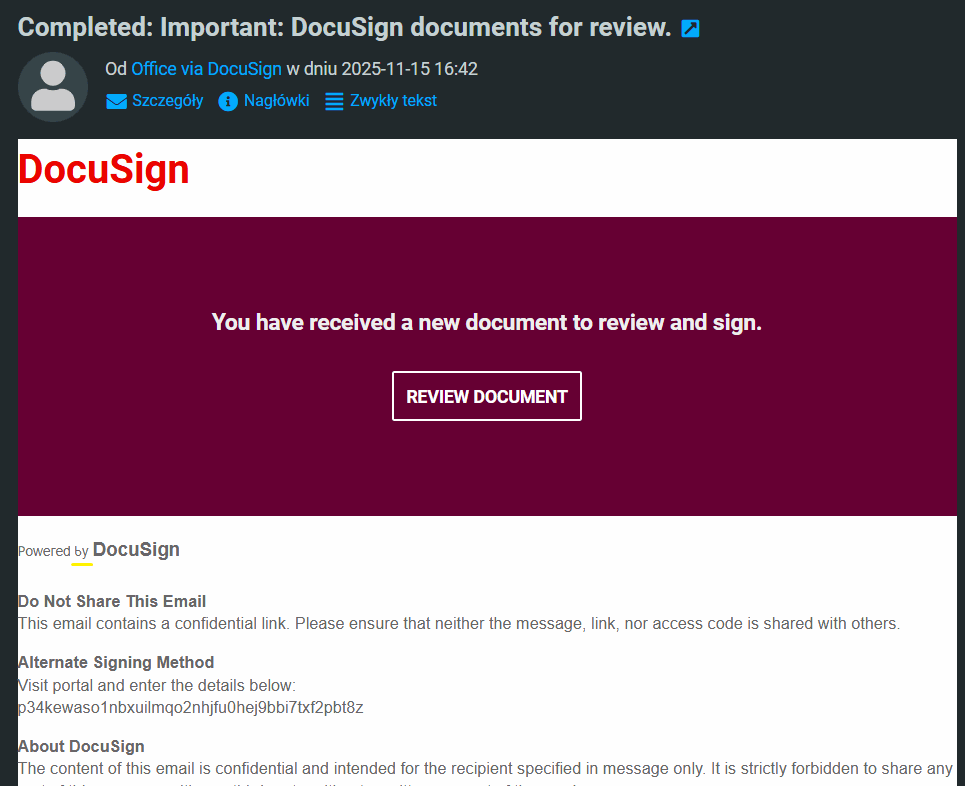
This is a particularly dangerous type of phishing email, since DocuSign is used to deliver important documents that require a digital signature. The message looks genuine, but a sharp eye will spot an odd piece of text (highlighted in yellow), where in the phrase "Poweredy by DocuSign," the letter "b" isn't actually a Latin letter at all, it's a Cyrillic look-alike character! For some, that's proof enough that the email is suspicious, but it's also worth checking whether the sender is genuinely "office via DocuSign," or some random email address.
Summary
Phishing works mainly because it exploits trust and a sense of urgency. The message looks familiar, the matter seems pressing, and clicking a link takes a split second.
That's why vigilance is your best defense. Always check the sender, check the page address, and take a moment to think before entering any data at all.
Importantly, suspicious messages don't only come from unknown senders. Sometimes criminals take over email accounts or social media profiles and send messages from addresses we'd normally trust without question.
In the world of cybersecurity, one rule works exceptionally well: if something in a message feels even slightly off, it's better to check it twice than to click once too many times.
Wondering how to improve your company's cybersecurity? Get in touch with us and tell us about your situation, and we'll help you choose solutions that better protect your business, not just against phishing attacks.