Google Ads
Meta Tags on Websites and Online Stores: Why They Matter So Much
The meta title and description are part of your business card in Google. See how to write them well to attract more clicks, boost your visibility in search results, and stand out from the competition. This guide is a must-read for anyone running a website or an online store.

If you run a website, a blog, or an online store, you probably want your site to show up well in Google. But did you know that how your page presents itself in search results has a huge impact on whether anyone clicks on it in the first place?
Meta content is short text that doesn't appear on the page itself, but shows up in Google's search results (the so-called SERPs). It's the user's first point of contact with your site, often before they've even decided to visit it. Read on to learn what it's made of, how it shapes user intent, and how to optimize it well.
What are meta tags? What are the basic meta tags?
Meta tags (also called meta content) are special markers placed in a page's HTML code, inside the <head> section. They aren't directly visible to visitors (aside from the title shown on the browser tab), but they pass information to search engines, browsers, social media, and indexing crawlers.
Meta title
This is the main heading of your page as it appears in search results. It's displayed in blue and works much like an article's headline – its job is to grab attention and tell the user what the page is about.
Example: Running Shoes – Online Store with Free Delivery | RunWell.com

Meta description
This is a short summary of the page's content, displayed below the title. Its job is to encourage the user to click – like a mini ad.
Example: Looking for comfortable running shoes? Check out our range! Free delivery and returns within 30 days, for a limited time only.
Meta titles and meta descriptions are often referred to together as meta content.
What other meta tags are there?
| Meta tag | What does it do? | Where does it matter? |
| <title> | Displayed as the page title in Google and on the browser tab | SEO, UX |
| <meta name="description"> | A short description of the page – may appear in search results | SEO |
| <meta name="robots"> | Specifies whether Google's crawlers should index the page and follow its links. Example of a non-indexed page:<meta name="robots" content="noindex" /> | Technical SEO |
| <meta charset="UTF-8"> | Defines the character set (e.g., for Polish characters) | Technical |
| <meta name="viewport"> | Scales the page for mobile devices | Mobile UX |
| <meta name="author"> | Information about the page's author | Informational |
| <meta name="keywords"> | Formerly used to list keywords (ignored by Google today) | Outdated |
| <meta property="og:title">, <meta property="og:description"> | Open Graph meta tags – control how the page looks when shared on social media (e.g. Facebook) | Social Media |
| <meta name="theme-color"> | Sets the mobile browser color (Android, Chrome) | UX |
Meta tags are placed in the <head> section of the HTML document. Example:
<head>
 <meta charset="UTF-8">
 <meta name="description" content="Free Web tutorials">
 <meta name="keywords" content="HTML, CSS, JavaScript">
 <meta name="author" content="John Doe">
 <meta name="viewport" content="width=device-width, initial-scale=1.0">
</head>
In the past, meta content was added manually to a page's code. Nowadays, it's mostly done through the admin panels of stores and CMS platforms, or through plugins such as Yoast SEO for WordPress.
Why does meta content matter so much?
1. It's often the customer's first contact with your site
The meta title and meta description are the first point of contact – the first thing a user sees in Google. Before they even visit your site, they judge it based purely on those two lines of text.
Well-written meta content:
- grabs attention,
- communicates key value,
- increases the chance of a click (CTR).
2. It increases click-through rate (CTR)
CTR (Click-Through Rate) is the percentage of users who click a link in the search results. Even if you're ranked #1 in Google, if your meta description is bland, users might click on a competitor instead.
A compelling title and a persuasive description can:
- help you stand out from the competition,
- increase traffic to your site,
- improve conversion (sales, inquiries, etc.).
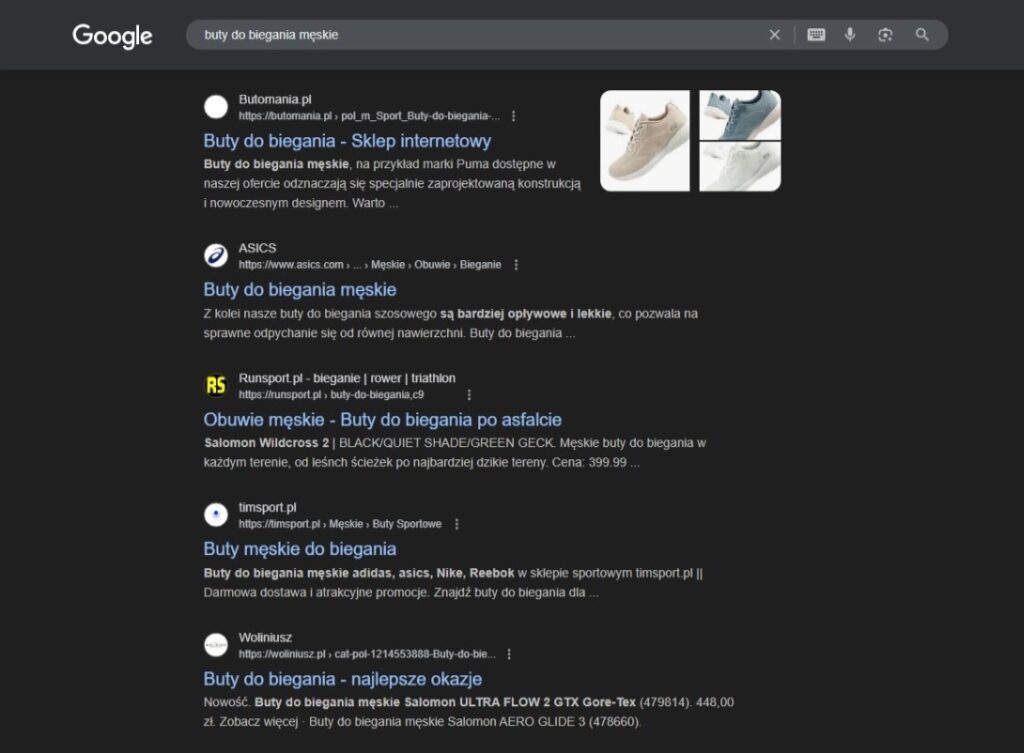
Here's a preview of search results (SERP) for one query, showing several meta content examples in different formats – more on this below.
3. It supports SEO and search rankings
Google treats the meta title as a ranking factor, which means a well-crafted title (containing relevant keywords) can influence your page's position in the results.
The meta description, on the other hand, doesn't directly affect ranking, but it does affect CTR – and that can matter to Google, since more interest translates into more perceived value.
The variety of meta content out there
Given how much meta content shapes user intent, the natural question is: how do you write it well? Let's start with a comparison – we've prepared 3 example search results. Which one would you be most likely to click?



The first description is completely unoptimized – it doesn't use up the character limit for the meta title and description, doesn't include the full keyword phrase in the description, and offers no content that would encourage the user to click. The meta description looks like a default description generated by an e-commerce platform for a given category – and that's exactly how we modeled it. This is a common situation, especially for website owners who manage their own site or store content – lack of awareness, or hidden meta settings, makes these issues hard to spot and fix.
The second description meets both Google's and users' expectations. It includes a broad meta title with the full keyword phrase ("men's running shoes"), words that broaden the intent, and the store's name – which builds brand recognition.
The meta description draws the user in by referencing the page's relative popularity (our bestselling shoes – meaning plenty of customers have already bought them here), it covers the most important criteria for choosing shoes (comfort, grip, and, further down the list, looks), and includes a call to action (CTA) in the form of a simple "Buy now!" (though it could still use additional value points for the customer, like free delivery or an easy return process).
You can also spot "star ratings" – meaning Schema markup has been correctly configured on the page and processed by Google for display. Schema data doesn't just provide extra information; it also increases attractiveness by helping the listing stand out from other search results.
As for the third description, it may not be the worst, but two things are worth noting. First, do users searching for running shoes really care about style as the main factor, ahead of comfort or technology? The meta description also stands out for another reason – it reads like a random chunk of text pulled from somewhere on the page rather than a purpose-built meta description. Why is that?
Can Google change my meta titles and descriptions?
Yes – and it happens more often than you might think. Even if you carefully craft your own meta titles and meta descriptions, Google may replace them with its own version when it decides that version better matches a particular user query. This doesn't mean there's necessarily an error on the page – but it can indicate that your meta content could be improved, or that it isn't targeting user intent well.
Why does Google change meta content?
Google has one main goal: keep the user satisfied and match search results to their query as well as possible.
Meta data may get replaced when:
- your meta description is too generic, duplicated, or bland,
- the title is too long, hard to read, or contains only the brand name,
- the meta data doesn't include keywords related to the query,
- Google finds a more relevant snippet within the page's content than the meta description itself.
What does this look like in practice?
Your configured meta data:
- Title: "Homepage | Store XYZ"
- Description: "The best online store. A wide range of products."
User's query:
"women's down jackets store XYZ"
What might Google do?
Instead of your description, Google will display a snippet of content from the product category page, such as the category description:
"Women's down jackets at Store XYZ – warm, lightweight, and stylish. Check the available sizes and colors!"
This description is a better match for the query, so it has a higher chance of being clicked, and that's Google's priority.
Can I prevent this?
You can't fully force Google to always show exactly what you set in your meta data. But you can significantly increase the odds that your content will be used unchanged.
How do you achieve that?
- Write unique, specific meta descriptions for every page.
- Use natural keywords that match real user queries.
- Write descriptions like mini-ads: with value, differentiators, and a call to action.
- Don't go too far over the recommended length for meta content:
- Meta title: up to 60 characters
- Meta description: up to 150–160 characters
Google may change your meta content, but you don't need to worry about it if you focus on quality. Remember: a meta description isn't just a technical SEO element – it's your ad inside Google. If you don't make the most of it, Google will do it for you, and not always the way you'd like.
How do you write better meta titles and descriptions?
1. Include keywords
Think about what a user types into Google when looking for what you offer. Weave those phrases into the title and description naturally, not artificially. A good example:
Men's Winter Jackets – Trending Styles for 2025 | Store X
2. Write specific, concise content
The meta title should be no more than about 55–60 characters, and the meta description around 150–160 characters. Don't write vague generalities – show what the user gains by clicking. Use elements like:
- unique features ("natural ingredients," "100% cotton"),
- a call to action - CTA ("Check the offer," "Order now"),
- benefits and added value for the customer ("free delivery," "30-day returns").
3. Write for people, not robots
Don't force keywords in. The text has to sound natural and inviting. Here's an example of repetitive text – categorically, don't write like this:
Shoes, sports shoes, men's shoes, cheap shoes, running shoes…
Meta content like this will most likely be replaced automatically by Google. Avoid repetition, overly technical language, and exaggerated promises.
4. Add a standout element
Numbers, promotions, questions – all of these can catch the eye. You can also experiment with emoji (though they don't affect Google rankings). Example:
🔥 2025 season hits – winter jackets at 50% off!
Where and how do you add meta content to a page?
If you have a WordPress website, you can easily add a meta title and description for every page and post. SEO plugins (Yoast SEO, RankMath) also show a Google preview and warn you if the text is too long. Similarly, most e-commerce platforms have built-in fields for entering meta data on products, categories, and informational pages.
Summary – take care of your site's or store's meta content
The meta title and description are your business card in Google – they're where the user's decision to click your link begins.
Good meta content should include relevant keywords, describe the benefit to the user, and stay concise, so it delivers value to both the user and Google.
The most common mistakes when writing meta content
- No meta description – Google then picks something itself, often not a great match
- A title that's too long – it gets cut off in Google
- The exact same title used on many pages – no uniqueness
- Descriptions with no value – dull, generic, no call to action
- Keyword stuffing – unnatural, artificial-sounding text
Need help writing effective meta descriptions?
We know meta tags can sound technical, but you don't have to figure it all out on your own. Good meta content isn't just about SEO, it has a real impact on traffic and sales.
We can help you:
- review the current meta titles and descriptions on your site,
- identify which ones are worth improving,
- create new ones that are more clickable and better matched to user intent.
Take the first step toward better visibility in Google, and more customers. Click below or fill in the form: