SEO
How to Set Up a Google Business Profile: Taking Your First Step Toward Growth
A Google Business Profile is a free tool that gives your business visibility.
Starting and promoting a business comes with plenty of challenges, especially for entrepreneurs taking their first steps in the sprawling world of business. Still, the initial steps toward effectively promoting a business on Google don't look nearly as daunting once you consider the free tools available today from the biggest platforms out there. One of them is the Google Business Profile - commonly known simply as a Google profile - which serves as a stable foundation for growing a business, especially in its early days.
Google Business Profile (formerly Google My Business, or GMB for short) is a free, intuitive tool available to any business owner - even without any technical experience. It's connected to Google Maps, which means it gives your business visibility not just in basic search results, but also marks its location, translating into real benefits on the local market. A profile won't pass verification if the business doesn't have a physical location and a real address.
Setting up your business profile is one thing - but when should you start promoting it?
Simply setting up a Google Business Profile is just the beginning. Real impact on search visibility comes from consistent optimization - and that's exactly where local SEO comes in. Filling in information thoroughly, adding photos, posting regularly, and actively responding to reviews are all actions Google rewards with a higher position in local results. The more complete and active your profile is, the greater your chances of appearing in the so-called Local Pack - the three recommended businesses shown right at the top of the search results. Below, you'll find a step-by-step guide to setting up a Google profile and starting to build your online visibility.
How do you create a Google profile? It's simpler than you think
To set up a GBP profile, you need an existing Google account. It doesn't have to be a Gmail account. The most professional option is using an email address on your company's domain. This turns out to be extremely practical if you ever forget your password - and let's be honest, it happens to everyone. Recovery and any security changes will be easier that way.
Step 1: Find your business
Before creating a new profile, check whether your business already exists on Google. It may have been added by a customer, a previous owner, or generated automatically by Google based on data found online. If such a profile already exists, don't create a new one - claim the existing one and fill it in instead. Creating a duplicate can get it removed by Google.
If your business hasn't been added to Maps yet, take one simple step: click "Add your business."
Step 2: Business name
At the start, Google asks for two basic pieces of information: your name and your business category. In the name field, you don't have to use only your official registered business name - adding a prefix describing the type of business can help customers find you faster (e.g. "ABC Store" instead of just "ABC").
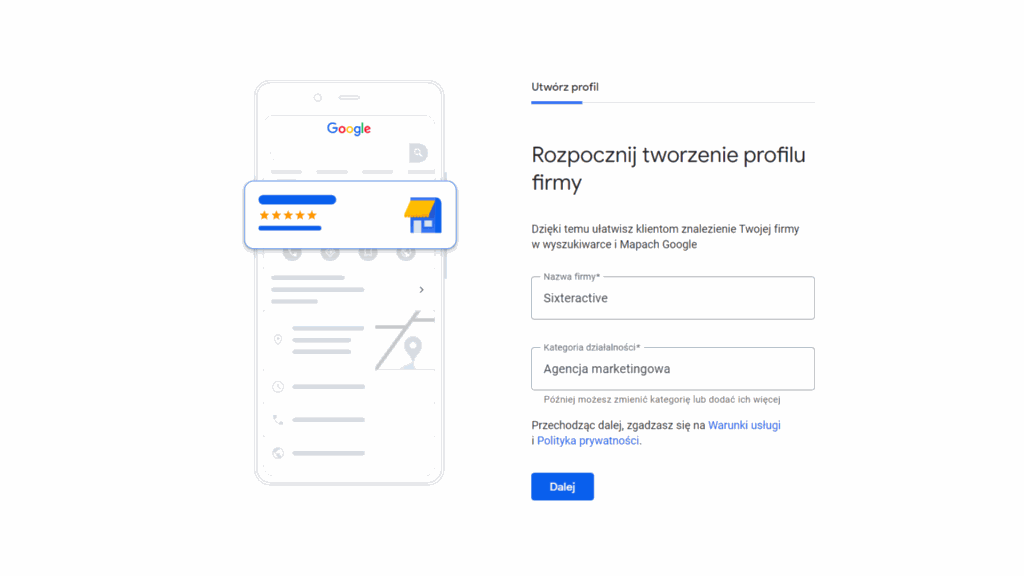
Choosing a category is one of the more important steps for local SEO. It's what Google uses to decide which queries should surface your profile. Google Business Profile categories are quite extensive - it's worth taking a moment to pick the one that best fits your business. You can also add additional categories if your business operates in several areas.
Step 3: Location
The next step is filling in your address details. This is what gets your business profile onto Google Maps - customers will be able to check your address, see a pin on the map, and get directions with a single click.
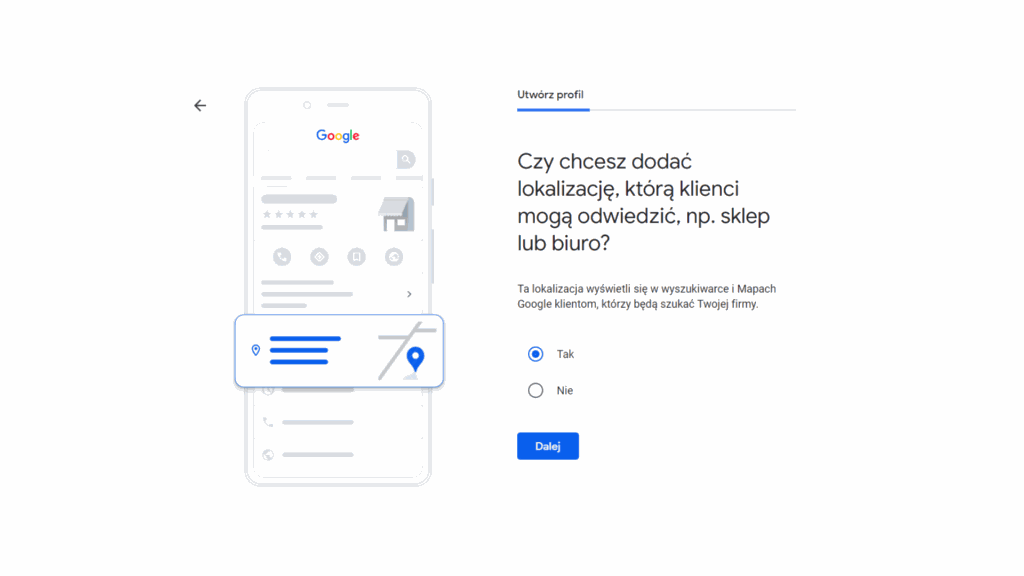
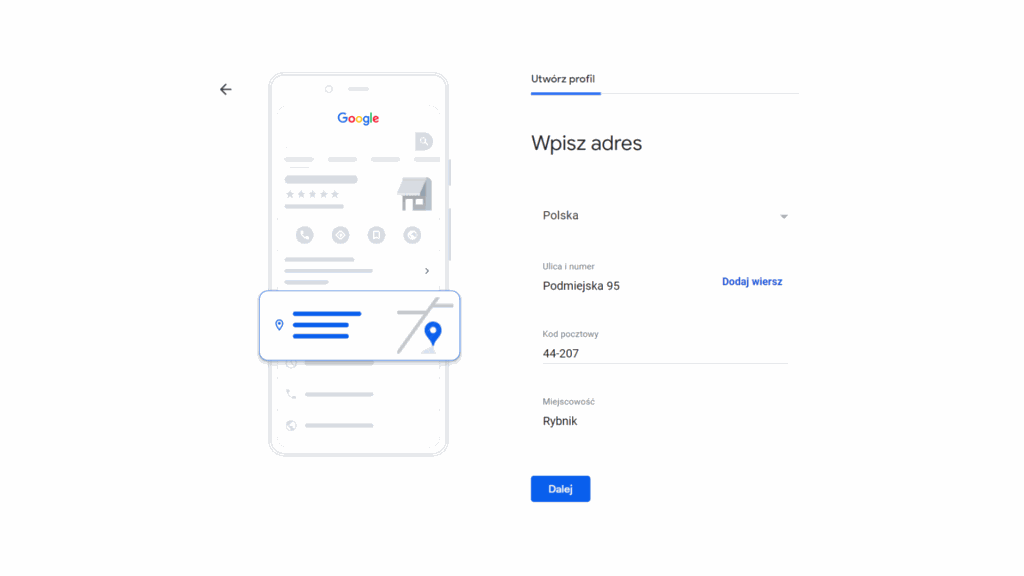
A useful note: at this stage, after filling in your details, you might notice that Google has already found a business with a similar name or at the same address. This happens because another Google user - such as a Local Guide - may have already added information about your business and its location. In that case, it's best to verify your business with Google.
The next thing Google will ask about is whether you deliver goods or provide services at the customer's location or out in the field - for example, as a plumber, electrician, or courier company. If you operate in the field, select this option and define the area your business serves. This matters for visibility in local search results.
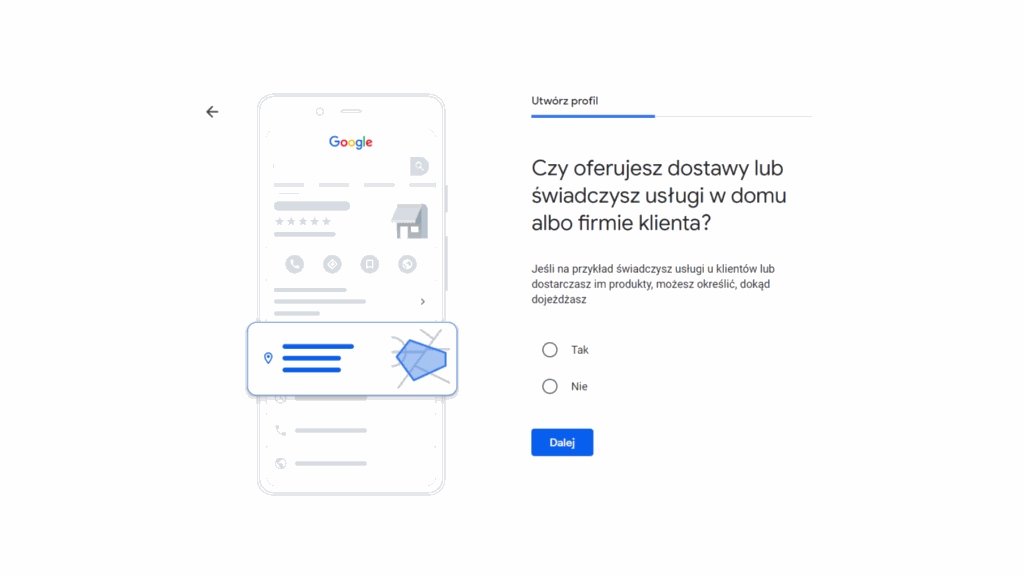
Step 4: Contact details
Enter your phone number and website address. These are crucial details - a customer who finds your profile on Google should be able to reach you immediately. Make sure your phone number and website address are consistent with the information on your own website - discrepancies negatively affect local SEO.
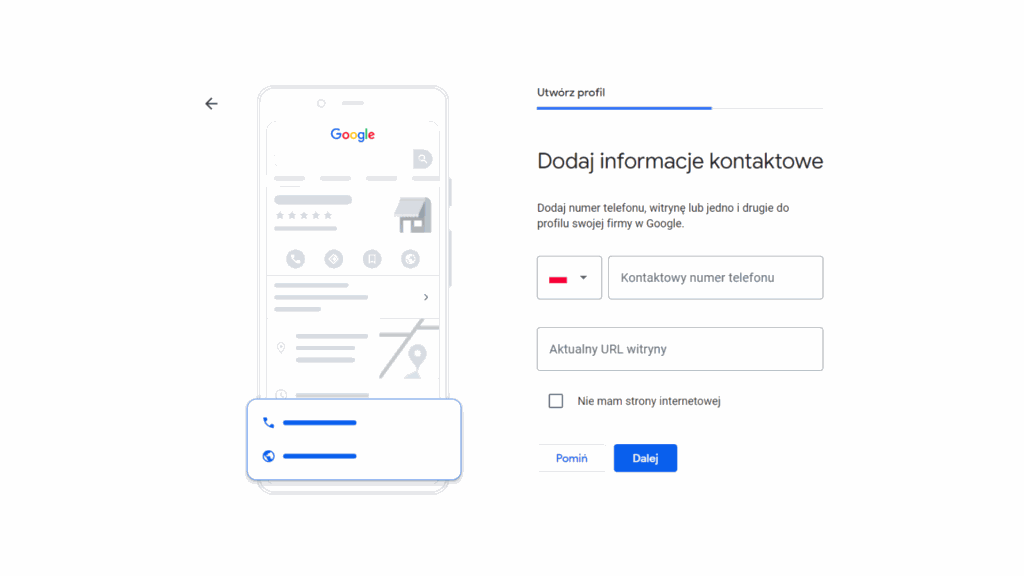
Almost done! Once you've completed these steps, your Google Business Profile is ready - but it hasn't been verified yet. Without verification, your profile won't be visible in search results or on Google Maps.
Step 5: No going anywhere without verification
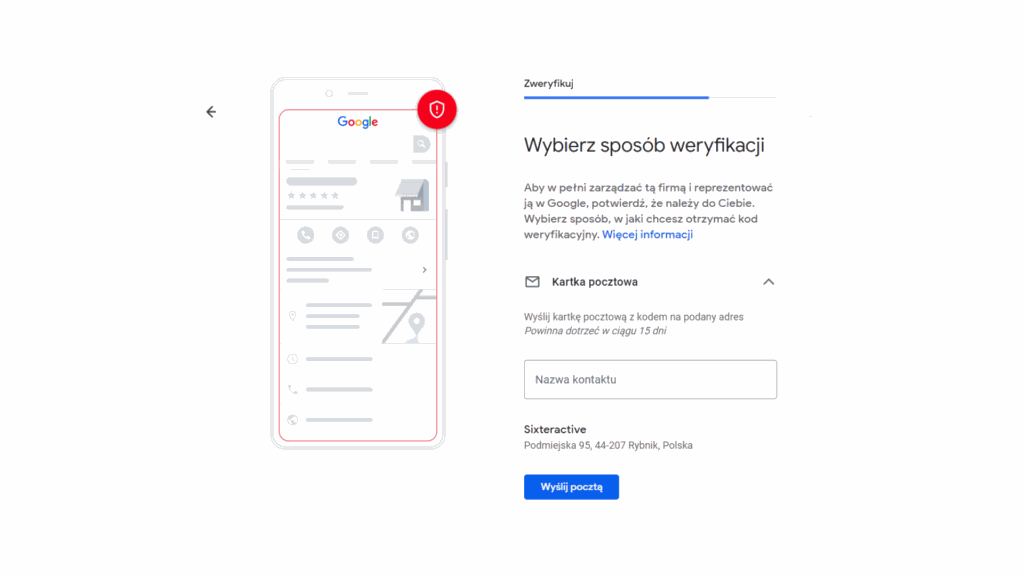
Verification confirms that the business actually belongs to you. Google offers several verification methods - the options available depend on the type of business and the category you selected:
- Postcard with a code - sent to your business address, the classic method available to everyone.
- Video verification - a recording confirming your business's physical location; as of 2026, this is most often offered as the default option.
- Phone verification (SMS) or email - available for select business categories.
Regardless of the method you choose, your profile won't be visible on Google Maps or in search results until verification is complete.
Step 6: The final stretch - optimizing your profile
Fill in your opening hours, enable the option for customers to contact you, and write a business description. The description should be specific, clear, and include keywords related to your business and location - this is one of the factors Google considers when determining your position in local results. Don't overdo it on length: a few well-written sentences make a better impression than a long stretch of text nobody will finish reading.
Upload photos related to your business - your logo, the exterior of your building, the interior, a team photo, and photos of your offers and services. Add your services and products to the profile, along with descriptions. Publish updates on your profile. As a general rule - the more complete your business profile, the better.
Summary
Your Google Business Profile is now ready - and you can edit it at any time from your Google account. The interface is intuitive, and changes are usually reflected quickly.
Keep in mind, though, that setting up the profile is only the start. As mentioned above, filling the profile out with data and actively maintaining it - regularly updating information, adding photos, responding to reviews, and publishing posts - genuinely translates into a higher position in local results and more inquiries from customers. Google sees that a business is active and genuinely engaging with users browsing the web.
Remember: until verification is complete, your profile won't be visible on Google Maps or in search results.
You know how - but why? What does a Google Business Profile actually do for your business?
A Google Business Profile is today one of the most important points of contact between a business and a potential customer. When someone types a service and a city into Google, before they land on any business's website, they see local profiles first. Your profile is where a customer checks your address, phone number, opening hours, photos, and other people's reviews in a matter of seconds. If the profile is complete and well cared for, it builds trust even before the first contact.
What exactly does a well-maintained Google Business Profile give you?
- A higher position in local results - a complete and active profile has a real impact on whether you appear in the Local Pack (the three businesses shown at the top of results).
- More customers - profiles with photos generate 35% more clicks; businesses with complete information get up to 25% more website visits.
- Credibility - customer reviews visible directly in Google are one of the strongest trust signals for new audiences.
- Direct contact - a customer can call, get directions, or visit your website with a single click.
In short: promoting your business on Google starts right here, with your Business Profile. It's a free tool that, with a bit of attention, works for your business around the clock.
Your first step is done - time to speed things up!
You've now got your Google Business Profile - what's next? This is a good moment to think about the next steps: collecting customer reviews, running a business social media profile, regularly updating content, and eventually maybe ad campaigns or website SEO. Each of these actions strengthens your online presence and brings more and more customers your way.
If you want to know how to promote your profile and rank above the competition in local search results, check out our article on local SEO and the Google Business Profile. And if you'd rather leave it to specialists - get in touch with us and find out what we can do for you.