SEO
Google Search Console Now Shows How Your Social Media Performs in Search
Google Search Console just got a new feature - you can now check how your content from Instagram, TikTok, X, and YouTube performs in Google Search. We look at exactly what changed and why it's worth paying attention to, even if marketing isn't part of your day-to-day.
Google Search Console has for years been associated with one thing - checking how a website performs in search. That's about to change - Google has rolled out a new feature called "platform properties," which lets you use the same tool to see how your content from Instagram, TikTok, X, and YouTube performs in search.
The feature has already started rolling out gradually to Google Search Console users. It's a good opportunity to take a closer look at exactly what's changed, how to set it up, and - most importantly for us - why it matters even if marketing isn't something you handle day to day for your company.
What are platform properties?
Platform properties are a new type of property you can verify in Google Search Console - alongside the already familiar domain or URL-prefix verification. The difference is that this time you're not verifying your website, but an account on one of four platforms: Instagram, TikTok, X, or YouTube.
Once verified, Google starts showing data on how that account's content appears in search results - which queries lead to your posts or videos, and how users interact with what you publish.
The data flows into three sections of Search Console you're already familiar with:
Performance report
You'll see the total number of clicks, impressions, and other metrics. Data can be filtered and sorted to check which specific posts and queries generate the most traffic. If you'd rather analyze the data in another tool, you can export it.
Insights report
A more accessible, high-level view - recent traffic trends, your best-performing posts, and information about how people reach your account from Google.
Milestones
A section that lets you track your account's growth and "unlock" successive milestones - for example, the moment your clicks from Google over the past 28 days cross a certain threshold.
Again - the rollout is gradual, so platform properties may appear in your Search Console account with some delay.
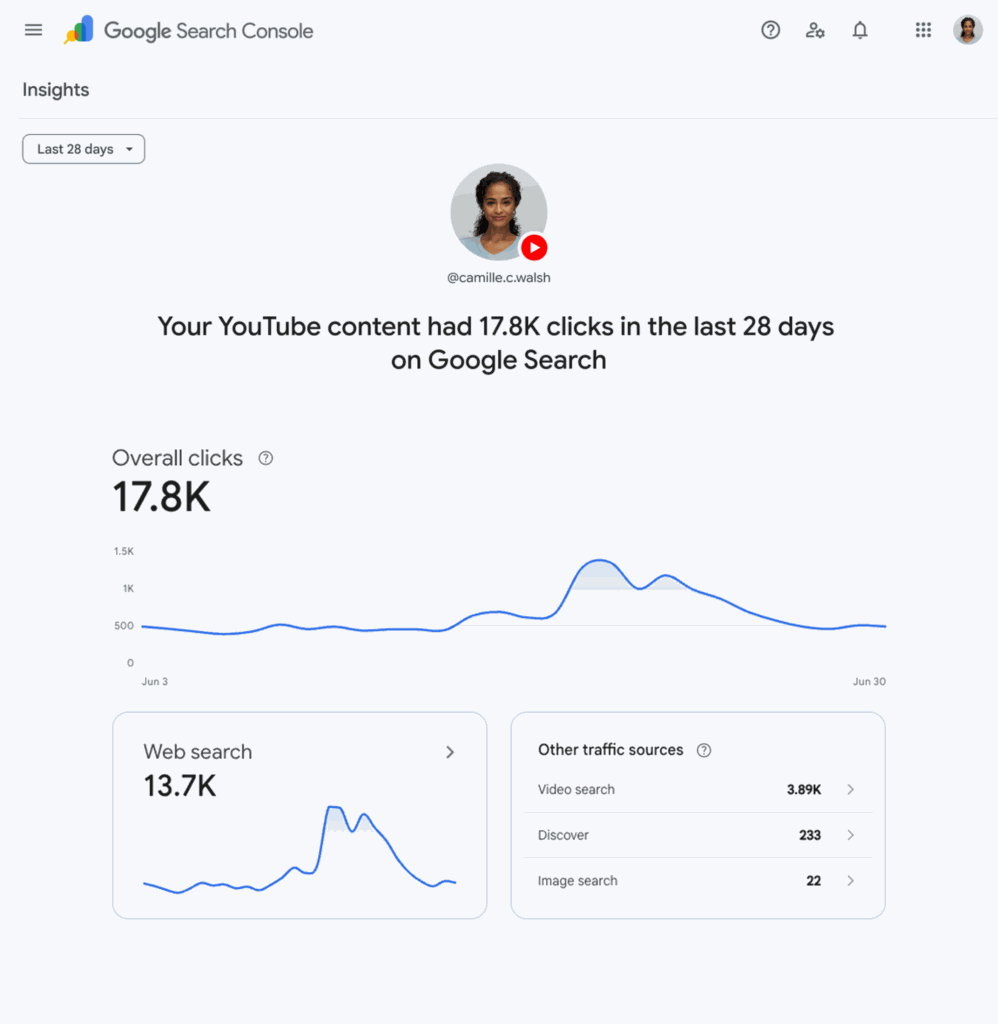
Source: Google Search Central Blog
How to set it up
Setup works much like adding a regular property in Search Console:
- Open Google Search Console.
- Go to the property verification page, or open the property selector and choose "Add property."
- Select one of the four available platforms: Instagram, TikTok, X, or YouTube.
- Go through the verification steps, which securely authorize the connection between your account and Search Console.
The whole process takes a few minutes and doesn't require advanced technical knowledge.
Why is it worth doing?
A fair question at this point is: Instagram, TikTok, and YouTube all have their own analytics panels, so why do you need yet another place to check the same data?
The thing is, each of these platforms only shows you what happens inside it - how people react to your content as they scroll their feed or watch videos. Until now, there was no easy way to see how that same content performs in a completely different context - in Google Search, where someone deliberately types a query and lands on your post or video.
Platform properties bring these two worlds together in one place. Instead of logging into four separate panels and trying to piece the data together yourself, you get a single view showing where in search your social content is driving traffic from - alongside the data for your website, which you've probably already verified in the same tool.
This matters especially for business owners who aren't deep in marketing day to day. Search Console is already a tool worth having connected to your site - if only to know whether Google can even see and index your website. Platform properties are another good reason to do it: you get a broader picture of how your company shows up in search, whether that's through your website or your social media accounts.
What this means in practice for your business
If you run active accounts on Instagram, TikTok, X, or YouTube, and you also care about that content supporting your brand's visibility on Google, it's worth:
- verifying the relevant platform properties in Search Console,
- regularly checking which posts drive traffic from search - a good hint about which topics are worth developing further,
- treating this as a complement to, not a replacement for, the analytics available in each platform's own panel.
The feature itself won't automatically boost your visibility on Google, but it gives you something that was missing before - a single point of reference where you can assess whether your social media presence actually translates into something more than just likes and comments.
If you don't have the time or the confidence to make sense of this data, or to put together a broader strategy for your brand's presence in search and social media, get in touch with us and get a wider view of your online visibility.